
144 lines
6.1 KiB
Markdown
144 lines
6.1 KiB
Markdown
<div align="center">
|
|
<img src="assets/icon.svg" alt="HTT logo" width="120" height="120"/>
|
|
|
|
# HTT - Hyprland Toggle Tiling
|
|
|
|
Logo taken from [Papirus](https://github.com/PapirusDevelopmentTeam/papirus-icon-theme). I'm not a designer, don't judge me.
|
|
|
|
[](https://cplusplus.com/)
|
|
[](https://hyprland.org/)
|
|
[](https://typofelho.ddns.net/TypoMustakes/hyprland-toggle-tiling/src/branch/master/LICENSE)
|
|
[](https://typofelho.ddns.net/TypoMustakes/hyprland-toggle-tiling/graph)
|
|
|
|
A simple program to toggle tiling and floating modes for windows in the Hyprland Wayland compositor.
|
|
|
|
Check out [the demo](https://typofelho.ddns.net/TypoMustakes/hyprland-toggle-tiling/src/commit/da423421aaa99f906962e3fd0330d0d88b5b1aa2/assets/demo.webm)!
|
|
|
|
[Features](#features) •
|
|
[Installation](#installation) •
|
|
[Usage](#usage) •
|
|
[Integration with Hyprland](#integration-with-hyprland)
|
|
|
|
</div>
|
|
|
|
## Features
|
|
|
|
- Quickly switch between tiling and floating modes for all windows on the active workspace.
|
|
- After switching, the program creates a hyprland config file to respect the new windowing mode.
|
|
Let's say you switched to tiling mode. From that point on, new windows will open in tiling mode as well.
|
|
Switch to floating mode again and newly opened windows will be in floating mode.
|
|
- Floating/tiling window rules are isolated between workspaces. You can set one workspace to be floating, and all the rest to tiling for example.
|
|
- Returns applied rule for the current workspace. Useful for scripting.
|
|
- Moving a window from a tiling workspace to a floating one changes the float state of the window to respect the new workspace.
|
|
- Useful for workflows that require both tiling and floating window management.
|
|
- Lightweight and easy to integrate with your Hyprland setup.
|
|
|
|
## Installation
|
|
|
|
You have a few options of obtainting the program.
|
|
|
|
### Install from AUR
|
|
|
|
You may install this program [from the AUR.](https://aur.archlinux.org/packages/hyprland-toggle-tiling-git)
|
|
|
|
### Download the release
|
|
|
|
You can also [download the release binary.](https://typofelho.ddns.net/TypoMustakes/hyprland-toggle-tiling/releases)
|
|
|
|
or go nuts and...
|
|
|
|
### Compile from source
|
|
|
|
1. Clone this repository:
|
|
```shell
|
|
git clone https://typofelho.ddns.net/TypoMustakes/hyprland-toggle-tiling.git
|
|
```
|
|
|
|
2. Enter project directory:
|
|
```shell
|
|
cd hyprland-toggle-tiling/
|
|
```
|
|
|
|
3. Create build directory:
|
|
```shell
|
|
cmake -S . -B build/
|
|
```
|
|
|
|
4. Enter build directory:
|
|
```shell
|
|
cd build/
|
|
```
|
|
|
|
5. Build the projects:
|
|
```shell
|
|
cmake --build .
|
|
```
|
|
|
|
# Usage
|
|
```shell
|
|
./htt <config-file-path> (flags)
|
|
```
|
|
- `-q`: Print the rule applied on the current workspace to STDOUT, but don't change anything. If there isn't an active rule for the current workspace, it returns a tiling rule. The returned string is a valid Hyprland window rule configuration line, like so:
|
|
|
|
```shell
|
|
# (On workspace 2...)
|
|
$ ./htt ~/.cache/htt/rules -q
|
|
|
|
windowrule = tile on, match:workspace 2
|
|
```
|
|
Potential applications for this are mainly scripts, like my waybar module here:
|
|
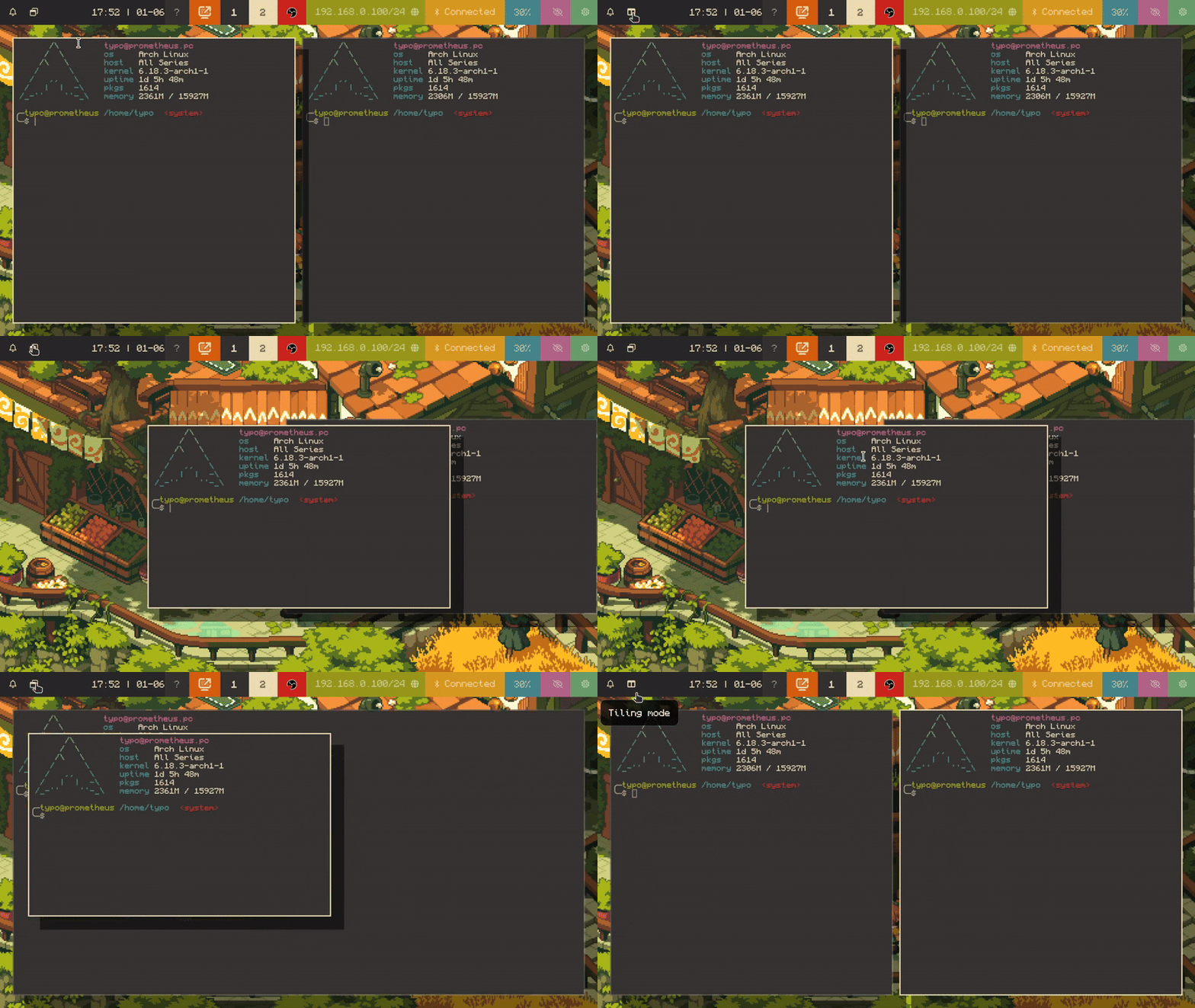
|
|
|
|
- `-m [integer]`: Move currently active window to specified workspace. Upon moving, the window will adapt to the windowing mode of the new workspace. Doesn't work with `-q`. See  for details.
|
|
|
|
- If the specified configuration file does not exist, it will be created.
|
|
- If the configuration contains existing rules, this should still work, but your existing configuration will probably get a bit messy, syntax-wise. I advise against it.
|
|
|
|
# Integration with Hyprland
|
|
1. Whatever configuration path you specify, include it in your Hyprland config, like so:
|
|
`/path/to/your/hyprland.conf`:
|
|
```conf
|
|
source = ~/path/to/specified/config/file.conf
|
|
```
|
|
|
|
2. Bind the script to a key in your Hyprland config:
|
|
```conf
|
|
bind = $mod + t, exec, /path/to/htt <config-file-path>
|
|
```
|
|
|
|
3. If you want windows to respect workspaces' rules after moving them to another workspace (see  for details), you might want to tell HTT to move your windows instead of telling Hyprland.
|
|
On the default configuration, this would mean changing this:
|
|
|
|
```sh
|
|
bind = $mainMod SHIFT, 1, movetoworkspace, 1
|
|
bind = $mainMod SHIFT, 2, movetoworkspace, 2
|
|
bind = $mainMod SHIFT, 3, movetoworkspace, 3
|
|
bind = $mainMod SHIFT, 4, movetoworkspace, 4
|
|
bind = $mainMod SHIFT, 5, movetoworkspace, 5
|
|
bind = $mainMod SHIFT, 6, movetoworkspace, 6
|
|
bind = $mainMod SHIFT, 7, movetoworkspace, 7
|
|
bind = $mainMod SHIFT, 8, movetoworkspace, 8
|
|
bind = $mainMod SHIFT, 9, movetoworkspace, 9
|
|
bind = $mainMod SHIFT, 0, movetoworkspace, 10
|
|
```
|
|
|
|
to this:
|
|
|
|
```sh
|
|
bind = $mainMod SHIFT, 1, exec, htt [your htt config file] -m 1
|
|
bind = $mainMod SHIFT, 2, exec, htt [your htt config file] -m 2
|
|
bind = $mainMod SHIFT, 3, exec, htt [your htt config file] -m 3
|
|
bind = $mainMod SHIFT, 4, exec, htt [your htt config file] -m 4
|
|
bind = $mainMod SHIFT, 5, exec, htt [your htt config file] -m 5
|
|
bind = $mainMod SHIFT, 6, exec, htt [your htt config file] -m 6
|
|
bind = $mainMod SHIFT, 7, exec, htt [your htt config file] -m 7
|
|
bind = $mainMod SHIFT, 8, exec, htt [your htt config file] -m 8
|
|
bind = $mainMod SHIFT, 9, exec, htt [your htt config file] -m 9
|
|
bind = $mainMod SHIFT, 0, exec, htt [your htt config file] -m 10
|
|
```
|
|
|
|
... in your configuration.
|
|
Otherwise, just use `exec, htt [your htt config file] -m [workspace ID]` wherever you used `movetoworkspace [workspace ID]` before.
|
|
|